Best Sega Saturn Emulators for PC, Android, and iOS (2026)
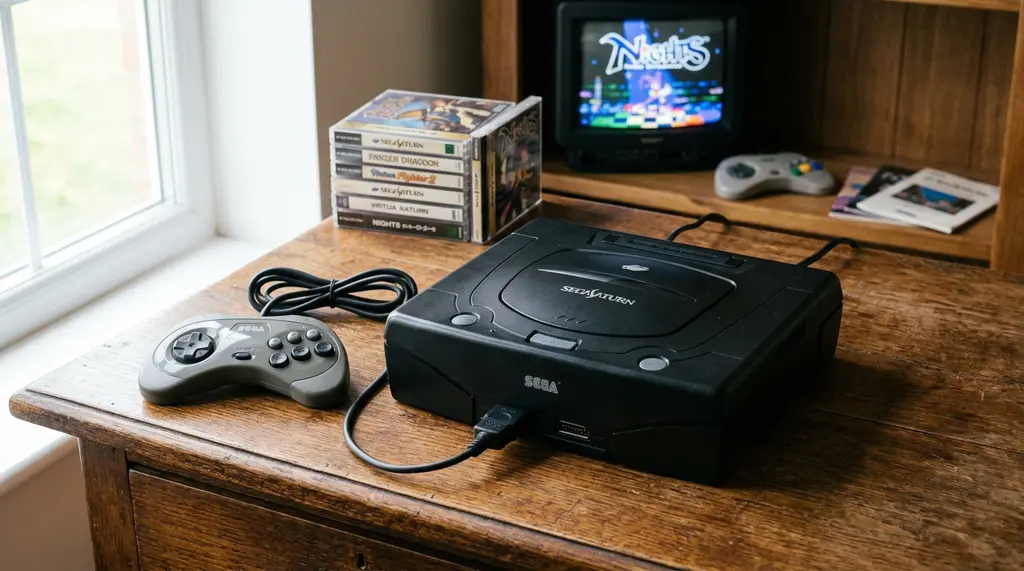
The Sega Saturn was released in 1994 and had a library of around 1,000 games, many of which have never been re-released or ported to modern platforms. That makes emulation the primary way most people can access Saturn titles today. Emulating the Saturn is technically demanding — the console uses eight processors running in parallel, including two CPUs and two video display processors, which means inaccurate emulation produces graphical errors, audio glitches, and crashes. Here is a breakdown of the best Saturn emulators across PC, Android, and iOS, and what each one is best suited for.
Why the Sega Saturn is difficult to emulate
Most consoles from the 1990s use a single main CPU that emulators can replicate relatively straightforwardly. The Saturn’s architecture is fundamentally different: it uses a dual-CPU setup (two Hitachi SH-2 processors), two video display processors (VDP1 and VDP2), a sound processor, a CD block processor, and several other dedicated chips. Each must run in precise synchronization, or games break. This complexity is why accurate Saturn emulation took significantly longer to achieve than emulation of the PlayStation, which was released at roughly the same time but has a simpler architecture.
Best Sega Saturn emulators for PC (Windows, Mac, Linux)
Mednafen / Beetle Saturn (RetroArch)
Mednafen’s Saturn core — available as Beetle Saturn in RetroArch — is widely considered the most accurate Saturn emulator available. It passes the largest number of compatibility tests, handles the widest range of games correctly, and is the standard recommendation for anyone who prioritizes accuracy. The trade-off is hardware demand: accurate Saturn emulation requires a modern CPU, and Mednafen does not offer upscaling or graphical enhancements. What it provides is a faithful reproduction of original hardware behavior.
RetroArch provides a front-end interface for Mednafen’s core that makes setup more accessible. BIOS files are required — specifically the saturn_bios.bin or regional variants. RetroArch supports Windows, Mac, Linux, and Android.
Kronos
Kronos is a fork of the older Yabause emulator with substantially improved compatibility and performance. It supports OpenGL and Vulkan rendering and includes optional graphical enhancements, including resolution upscaling. Compatibility has improved significantly over the Yabause base — most commercial games run at or near full speed on mid-range hardware. Kronos is available for Windows and Linux and is a strong alternative to Mednafen for users who want some graphical improvements alongside reasonable accuracy.
SSF
SSF (Satourne Saturn) is a Windows-only emulator with excellent compatibility, particularly for games that do not run well in other emulators. It has been in development since 2001 and handles many edge cases that cause problems in other emulators. The interface is less modern than Kronos or RetroArch, and configuration requires some manual work, but for games that misbehave elsewhere, SSF is worth trying. BIOS files are required.
BizHawk
BizHawk is a multi-system emulator designed primarily for tool-assisted speedrunning (TAS), but it is a competent general Saturn emulator as well. It uses Mednafen’s Saturn core internally, so accuracy is comparable. BizHawk’s main advantages are its frame-advance controls, savestate management, and movie recording features — useful for players interested in speedrunning or precise game analysis. For casual gaming, Mednafen or Kronos is a simpler choice. BizHawk is Windows-only.
Best Sega Saturn emulators for Android
Yaba Sanshiro 2
Yaba Sanshiro 2 (originally based on Yabause) is the leading Saturn emulator for Android. It includes hardware-accelerated rendering and resolution upscaling, which makes games look cleaner on modern phone displays than they did on CRT televisions. It includes a built-in high-level BIOS that works for most games without requiring you to supply original BIOS files, which simplifies setup significantly. Compatibility is good — the majority of the commercial library runs without major issues. A Pro version with additional features is available on the Google Play Store.
RetroArch (Beetle Saturn core)
RetroArch on Android supports the Beetle Saturn core and provides near-equivalent accuracy to the PC version. It requires more setup than Yaba Sanshiro 2 — specifically, you must download the Beetle Saturn core within RetroArch and supply BIOS files manually — but it provides the highest accuracy available on Android for games that have compatibility issues in Yaba Sanshiro 2. RetroArch is free and available on Android via the Play Store and directly from the RetroArch website.
Best Sega Saturn emulators for iOS
iOS emulation is more restricted than Android due to Apple’s App Store policies, which historically blocked emulators. As of 2024, Apple updated its App Store guidelines to allow emulators, which opened the door to legal distribution. Delta and RetroArch are available on iOS through the App Store, with RetroArch supporting Beetle Saturn. For Saturn specifically, setup on iOS follows the same pattern as Android RetroArch — download the core, supply BIOS files, and load CHD or ISO game files.
Best file format for Saturn games
CHD (Compressed Hunks of Data) is the recommended format for Saturn game files. It compresses multi-disc CD images into a single file without quality loss and is supported by Mednafen, Kronos, Beetle Saturn, and Yaba Sanshiro 2. Older formats — CUE/BIN, ISO/MP3, MDS/MDF — work in most emulators but take more disk space. BIN/CUE is a reasonable fallback if CHD conversion is not practical. If you are also building out a broader retro gaming library, our guide on how to choose video games covers what to look for across genres and platforms.
Compatibility comparison
| Emulator | Platform | Accuracy | Upscaling | BIOS Required |
|---|---|---|---|---|
| Mednafen / Beetle Saturn | PC, Android (via RetroArch) | Excellent | No | Yes |
| Kronos | Windows, Linux | Very Good | Yes | Yes |
| SSF | Windows | Very Good | No | Yes |
| BizHawk | Windows | Excellent | No | Yes |
| Yaba Sanshiro 2 | Android | Good | Yes | Optional |
| RetroArch (Beetle) | PC, Android, iOS | Excellent | No | Yes |
Frequently asked questions about Sega Saturn emulators
What is the most accurate Sega Saturn emulator?
Mednafen’s Saturn core (accessible as Beetle Saturn through RetroArch) is considered the most accurate Sega Saturn emulator available. It passes the most compatibility tests and handles the widest range of games correctly, though it requires original BIOS files and a reasonably modern CPU to run at full speed. SSF and Kronos are strong alternatives for Windows users who want good compatibility with different trade-offs.
Do I need a BIOS file to play Saturn games?
Yes, for most emulators. Mednafen, Kronos, SSF, and RetroArch’s Beetle Saturn core all require original Saturn BIOS files (such as saturn_bios.bin or regional equivalents like mpr-17933.bin for Japan). Yaba Sanshiro 2 on Android includes a built-in high-level BIOS emulation that works for most commercial games without supplying original files, making it the most accessible option for new users.
Why is the Sega Saturn so hard to emulate?
The Saturn uses eight processors running in parallel — two main CPUs, two video display processors, a sound processor, and several additional chips — all of which must be synchronized precisely for games to run correctly. Most other consoles from the same era use a single main CPU, which is far simpler to replicate in software. This architectural complexity is why Saturn emulation lagged behind PlayStation emulation by years despite the two consoles being released around the same time.
What is the best Saturn emulator for Android?
Yaba Sanshiro 2 is the most accessible choice for Android — it includes built-in BIOS emulation, hardware-accelerated rendering, and resolution upscaling. For maximum accuracy, RetroArch with the Beetle Saturn core provides better compatibility for games that have issues in Yaba Sanshiro 2, at the cost of more complex setup.
Can I play Sega Saturn games on iPhone or iPad?
Yes, since Apple updated its App Store guidelines in 2024 to allow emulators. RetroArch is available on the iOS App Store and supports the Beetle Saturn core. Setup requires supplying BIOS files and game images. The experience is broadly similar to Android, though iOS file management is somewhat more restrictive when it comes to importing ROMs from local storage.